Spotify Room
Feel connected through music.
01 Background /
Streamlining Third Party Integration at Flexport
I led the design for Flexport's integration with Shopify, aimed at expanding our customer base by reaching small businesses and individual users. This integration will allow Shopify users to utilize Flexport's services for booking and shipment tracking.
01 opportunity /
Streamlining Third Party Integration at Flexport
The current process of allowing a third-party platform or app to access Flexport client data and APIs is time-consuming and complicated. On average, it takes 8 minutes per client to retrieve and input credentials, and most clients require assistance to navigate the process. It is also not scalable as API client credentials are immutable and need to be re-generated again to access new additional APIs. The number of clientId/ClientSecret need to maintain will be number of applications * number of Flexport customers. There are about 5,000 Shopify merchants that align with Flexport Enterprise account structure and 42,000 SMB clients. Assuming we would onboard half of these merchants, authorization workflow will help save 1958 hours or 81 days for just Shopify integration.
high level goals
[Title]
Expedite account
creation process
On average, the account creation process takes 8 minutes. To streamline the process, certain steps should be automated.
Provide clarity
Each step must be distinct and have some kind of visual signal to direct visitors to the following ones.
User-friendly vocabulary
Avoid using technical terms that may hinder users from creating an account or make it difficult for them to use Flexport's services.
01 challenge /
Streamlining Third Party Integration at Flexport
The current process of allowing a third-party platform or app to access Flexport client data and APIs is time-consuming and complicated. On average, it takes 8 minutes per client to retrieve and input credentials, and most clients require assistance to navigate the process. It is also not scalable as API client credentials are immutable and need to be re-generated again to access new additional APIs. The number of clientId/ClientSecret need to maintain will be number of applications * number of Flexport customers. There are about 5,000 Shopify merchants that align with Flexport Enterprise account structure and 42,000 SMB clients. Assuming we would onboard half of these merchants, authorization workflow will help save 1958 hours or 81 days for just Shopify integration.

high level goals
[Title]
Expedite account
creation process
On average, the account creation process takes 8 minutes. To streamline the process, certain steps should be automated.
Provide clarity
Each step must be distinct and have some kind of visual signal to direct visitors to the following ones.
User-friendly vocabulary
Avoid using technical terms that may hinder users from creating an account or make it difficult for them to use Flexport's services.
02 Problem discovery /
[Gathering Insights]
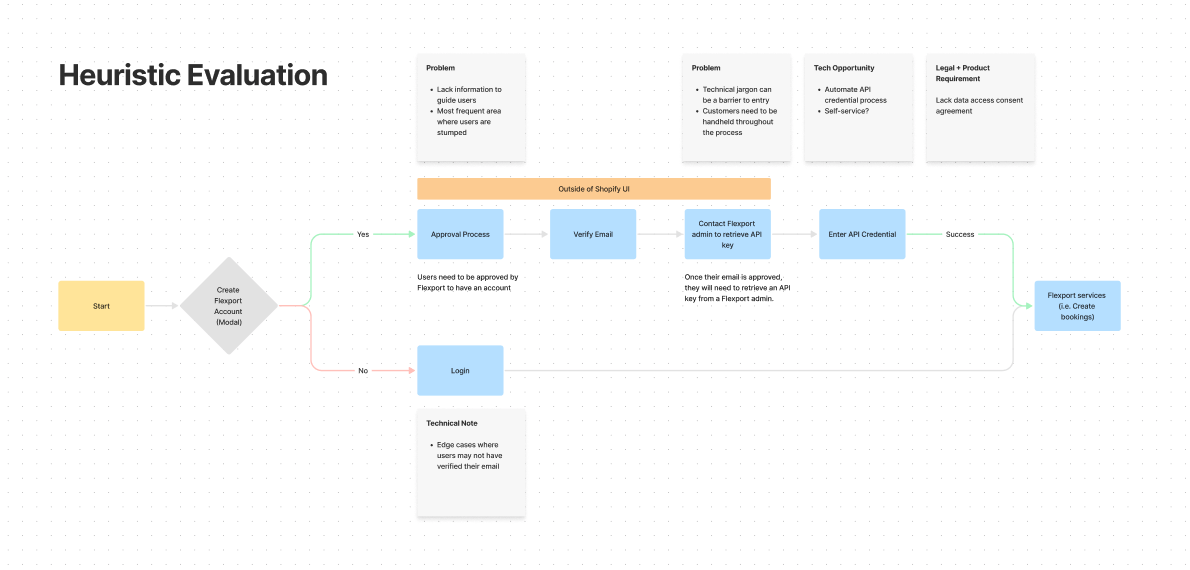
To kickstart the design process, I evaluated the current experience and gathered feedback from our beta/early customers on their experience with our product integration. I observed that they found the process tedious and confusing, creating barriers to entry and the need for additional support from customer solutions.

Prior to the existing experience, prospective customers had to request a quote and directly contact Flexport’s client solutions team to be set up with an account. In the MVP, we wanted to test self service account creation to our first set of Shopify users. We were able to identify some issues in the experience after conducting a heuristic evaluation and talking to users.
Insights from conversations with beta customers
Manual Intervention
To kickstart the design process, I evaluated the current experience and gathered feedback from our beta/early customers on their experience with our product integration. I observed that they found the process tedious and confusing, creating barriers to entry and the need for additional support from customer solutions.

Prior to the existing experience, prospective customers had to request a quote and directly contact Flexport’s client solutions team to be set up with an account. In the MVP, we wanted to test self service account creation to our first set of Shopify users. We were able to identify some issues in the experience after conducting a heuristic evaluation and talking to users.
Lacks Clarity
The experience is unintuitive due to the lack of visual cues and effective communication.

Design Opportunity: UX writing improvement by providing as much information as possible and being transparent about the process. Every interaction should trigger feedback, otherwise users will be lost. Communicate more effectively with users by writing clear, concise UI text and error messages.
Tech Jargon
Many small businesses may not have a technical role to assist with API integration, which can make the creation experience appear intimidating with its technical terminology. The use of technical jargon can lead to confusion, frustration, and exclusion for users. The account creation process presents a challenge for the majority of small businesses without technological expertise.Design Opportunity: user-friendly vocabulary, instructional but not verbose and ensure the product is customer-ready.
Problem statement
How might we reduce the process it takes to authorize an account and avoid roadblocks?
While the tech industry typically adheres to established patterns to ensure a smooth authorization flow, the process for a Flexport client to authorize a third-party platform or app to access their data and APIs is currently cumbersome and manual, causing significant friction. This difficulty in account authorization may dissuade SMBs from using our shipping services, leading to a potential loss of customers. Our aim is to offer a seamless experience to prospective clients and encourage them to use our services.
03 Synthesis /
[Prioritization and Planning]
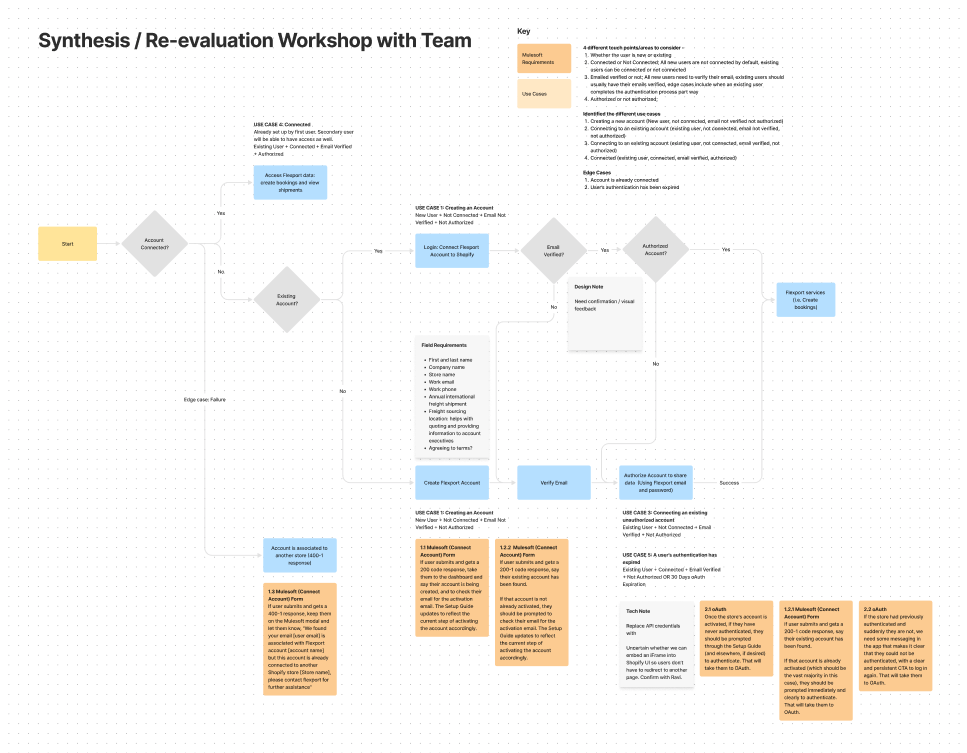
I had brainstorming sessions with Codal, IAM, and Public API teams to collaborate on identifying touchpoint, user pain points, product requirements, technical limitations, and potential edge cases, to prioritize what we are able to address first.
4 touch points
[Title]
User Type
There are two user types: Existing or new user
Connection
All new users are not connected by default, existing users can be connected or not connected. Being connected means
User Type
All new users need to verify their email, existing users should usually have their emails verified, edge cases include when an existing user completes the authentication process part way
Authorization / Authentication
Enable Flexport to have access to customer’s freight and booking data. All new users need to authorize their account. After 30 days, the authorization will expire and existing users will have to re-authorize their account.
Use cases + Edge cases
4 Use Cases + 
1 Edge Case
New user creating an account
There are two user types: Existing or new user
User Type
There are two user types: Existing or new user
User Type
There are two user types: Existing or new user
User Type
There are two user types: Existing or new user
User Type
There are two user types: Existing or new user
04 ideation /
[Design Exploration]
I had brainstorming sessions with Codal, IAM, and Public API teams to collaborate on identifying touchpoint, user pain points, product requirements, technical limitations, and potential edge cases, to prioritize what we are able to address first.
Ideas
Easy
UX Writing
Impactful UX writing to guide users seamlessly through the process
Visual Cues
There are two user types: Existing or new user
medium
Automate API
Implementing automated API credentialing can decrease the dependence on support. This feature can be easily executed since it has already been integrated into the Flexport product.
difficult
Differentiate the Login + Create Experience
Make create and login experience distinct to avoid confusion. However, this may prove challenging due to limited development cycles available.
Authorization on Shopify
Authorization can be achieved entirely on Shopify, it is probable that, for the time being, users will need to be redirected to the Flexport page to authorize their accounts.
Two Potential Approaches
[Talk about the two approaches to improve the experience ... where we are embedding]
Setup Guide
[[Reasons why the setup guide is good]]
System Status
[[Reasons why the setup guide is good]]
05 testing /
[Usability Tests]
To kickstart the design process, I evaluated the current experience and gathered feedback from our beta/early customers on their experience with our product integration. I observed that they found the process tedious and confusing, creating barriers to entry and the need for additional support from customer solutions.

Prior to the existing experience, prospective customers had to request a quote and directly contact Flexport’s client solutions team to be set up with an account. In the MVP, we wanted to test self service account creation to our first set of Shopify users. We were able to identify some issues in the experience after conducting a heuristic evaluation and talking to users.
option 1
System Status
[Talk about this experience]
option 2
System Status + Setup Guide
[Combined two different approaches]
Research Findings
High Level Insights
Wording
Some instructions are convoluted and verbose, whereas other pieces of text lack context.
Unclear Actions
Actions are still unclear leading to confusion and slow account creation / connection.
Setup Guide Preference
The setup guide instructions were perceived as more seamless in comparison to the system status concept. However, users pointed out that the system status managed to grab their attention.
Login + Sign Up
Users questioned why the sign up and login experience share the same modal.
Actionable items
Design changes to match user’s expectations + needs
Connection
Differentiate the signup and login experience to avoid user confusion.
UX Writing
Work with technical writer to improve the UX writing for a better user experience.
Visual Cues + Feedback
Provide visual cues and feedback to keep users informed about their current step.
06 iteration /
Sharing User Feedback + Iterating
We brought our findings and proposed solutions to a discussion with the developers to determine if the feature requests are feasible.

We wanted to separate the sign up and login flow as separate experiences but they weren’t certain if we were able to achieve it in the short time frame that we had. For now, the signup and login experience share the same modal. If a user has an existing account, we will map their first name, last name, and email to retrieve their account. However, we created concepts for both in case development has extra cycles to separate the experience.

Lastly, we are also unable to customize Flexport's authorization page due to the time constraint and impending release. The only action users can take is signing in to authorize access.
07 Final Design /
3rd Party Shopify Authorization
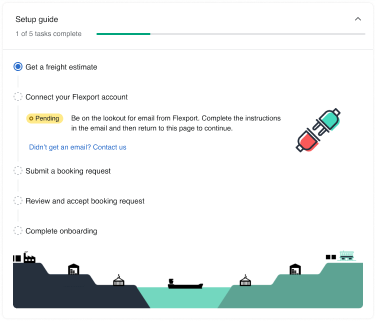
For the final design, we opted to embed the account creation and connection experience directly within the setup guide and include system statuses to highlight the ongoing user task. This decision was based on our understanding that users find it easier to follow instructions presented in a step-by-step format. Additionally, we made a design decision to include a system status feature, which effectively communicates and highlights important actions or statuses to users. By providing clear and concise messaging, users can more easily understand the current state of their account, and take the necessary actions to connect and authorize their account. Overall, these design decisions aim to provide users with a seamless and intuitive experience when connecting their Flexport account within the Shopify platform.
use case 1
New User
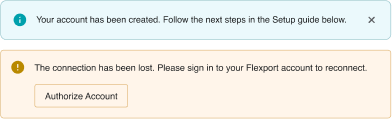
In use case 1, to create a new account, users will need to click on the "sign up" button and fill out a form. Once the account creation process is complete, they will be directed back to the setup guide. At this point, the system status will inform them that their account has been created successfully, and they will need to keep an eye out for an email from Flexport to verify their account. This email verification process is an important step to ensure the security and integrity of their account. Once the email verification process is complete, users will need to authorize their account to allow Shopify to access Flexport data and provide them with a seamless experience when booking and tracking shipments. This authorization process involves clicking on the "Authorize Account" button, which directs users to Flexport's authorization page. Once the authorization process is complete, users will be taken back to Shopify's app and informed that their account has been successfully connected to Flexport.
use case 2
Existing user with an unverified email and is not authorized
When a user who already has an account logs in, they will encounter the same login form as new users. But upon filling out the form, the system status will display a message indicating that their account already exists. If the user's email is not verified or their account is unauthorized, the setup guide will detect this and provide instructions on how to verify their email and authorize their account.
use case 3
Existing user who is not authorized
If an existing user has already verified their email account, the system will jump them to the Authorize Account step.
use case 4
Existing user
If an existing user already verified their email and is authorized, they will be directly taken to utilize Flexport’s service.
use case 5
oAuth 30 day expiration
If a user's authorization for Flexport's services has expired, after a period of 30 days, they will be prompted to reauthorize their account. At this point, the system status will notify them that their connection has been lost, and all actions will be disabled until they reauthorize. While users will still be able to view freight estimates and sailing schedules, they will not be able to take any actions. For pages such as Shipments and Bookings, they will be empty until the user logs in again. Clicking on the "Authorize Account" button will take them to Flexport's authorization page, where they can log in and reauthorize their account. Once they have done so, they will be redirected back to Shopify, and the system status will confirm that their account has been successfully authorized.
08 Appendix /
UX design recommendation and future updates
Included in the document is a supplementary section comprising a list of recommended items that the design team strongly suggests incorporating, should there be enough time.
Appendix 1.1
Create and connect modal
Problem
Create and Connect account experience share the same modal which can cause confusion and prevent users from completing their task.Low risk - Existing users could accidentally create an account if they enter in their email incorrectly. However, the form will be pre-filled so this problem will most likely not occur.
Solution
To avoid confusion, we should consider separating the connect and sign up modals into two distinct experiences in the following iteration. We can reduce the fields for the Connect Account experience to:
  • First Name
  • Last Name
  • Email
  • Store Name
To avoid confusion, we should consider separating the connect and sign up modals into two distinct experiences in the following iteration. We can reduce the fields for the Connect Account experience to:

We will be able to identify whether the user's account exists or not. In the event that the user's account does not exist, we will keep them in the same modal and display a warning banner informing them of the invalid login. If the account exists, we move them forward to the next step.
Appendix 1.2
Create and connect modal
Problem
Create and Connect account experience share the same modal which can cause confusion and prevent users from completing their task.Low risk - Existing users could accidentally create an account if they enter in their email incorrectly. However, the form will be pre-filled so this problem will most likely not occur.
Solution
To avoid confusion, we should consider separating the connect and sign up modals into two distinct experiences in the following iteration. We can reduce the fields for the Connect Account experience to:
  • First Name
  • Last Name
  • Email
  • Store Name
To avoid confusion, we should consider separating the connect and sign up modals into two distinct experiences in the following iteration. We can reduce the fields for the Connect Account experience to:

We will be able to identify whether the user's account exists or not. In the event that the user's account does not exist, we will keep them in the same modal and display a warning banner informing them of the invalid login. If the account exists, we move them forward to the next step.
Appendix 2.0
Create and connect modal
Problem
We should utilize user-friendly terms to communicate tasks they have to complete. Technical terms can be easily misunderstood by users.
Solution
We should refrain from using technical terms and keep tasks simple and easy to understand. Use "Login" in place of "Authorize Account," for example.
Appendix 3.0
Emphasis on oAuth expiration
Problem
Users risk missing the banner informing them that their account connection has been lost.
Solution
Users will be able to see right away that they need to take action to authorize their account if we are able to incorporate a login from this page.
Appendix 4.0
Need clarity on oAuth login
Problem
If we don't provide context for the "Accept and Continue" button on the login page, the user may become confused about what they are about to accept.
Solution
We recommend adding a description such as "To grant access to your company’s account and data," adding a data consent checkbox, and changing "Accept and Continue" to "Login."
    09 Conclusion /
    Final Notes
    Sharing User Feedback + Iterating
    We brought our findings and proposed solutions to a discussion with the developers to determine if the feature requests are feasible.

    We wanted to separate the sign up and login flow as separate experiences but they weren’t certain if we were able to achieve it in the short time frame that we had. For now, the signup and login experience share the same modal. If a user has an existing account, we will map their first name, last name, and email to retrieve their account. However, we created concepts for both in case development has extra cycles to separate the experience.

    Lastly, we are also unable to customize Flexport's authorization page due to the time constraint and impending release. The only action users can take is signing in to authorize access.